Try it
About fifteen seconds. The film opens on black title cards.
-
01 The ring
PressTap play.
The ring is the scale below the picture. It turns; each tick is painted as the film plays through it.
-
02 The record
ClickTap a later moment on the scale.
The stretch you skipped stays bare. An amber second mark stands where you left.
-
03 The way back
Press Z.Tap the button that appears.
Or the button that appears. You are back, and the second mark holds the place you came from.
Keys
Once the player has focus.
- Z
- Go back to where you were
- Space K
- Play, pause
- ← → J L
- Seek 10 seconds
- 0–9
- Jump to 0–90%
- ↑ ↓
- Volume
- M
- Mute
- C
- Captions
- < >
- Speed
- F
- Fullscreen
- I
- Picture in picture
Touch
- Tap
- Shows the controls without pausing.
- Double tap
- Seeks.
- Targets
- 44 × 48 px.
After use
A progress fill only knows where the playhead is. This is the band at 03:41, after three stretches of play and one jump back.
Nothing played: every tick engraved, none painted

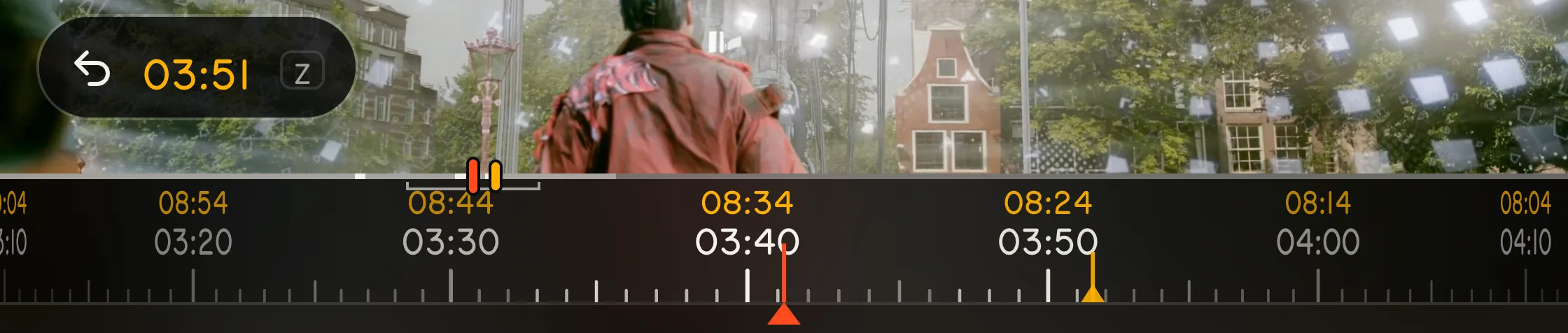

- Painted 02:46–02:50
- Painted 03:33–03:41
- Painted 03:47–03:51
- Second mark 03:51
Told to assistive technology
slider "Seek"
Played: 02:46 to 02:50, 03:33 to 03:41, 03:47 to 03:51
The record lasts for the visit; nothing is stored. Photographed from the player, not drawn; twice life size.
Underneath
A conventional Video.js 10.4 player: every standard control is a Video.js element.
- Seek control
- The rail: Video.js's own time slider. The scale: a pointer's shortcut.
- Reduced motion
- The scale holds still; the mark travels across it.
- Contrast
- Over pure white footage: control-row type above 12:1, amber above 7:1.
- Settings honoured
- Forced colours, canvas included; reduced transparency; increased contrast.
- Labels
- Every language Video.js ships; right-to-left is mirrored.
- Layout
- By the player's own width: 320 px to fullscreen.
- Touch
- 44 × 48 px targets. A tap shows the controls without pausing.
- Scope
- On-demand video.
- Checked
- Keyboard, fullscreen, picture in picture, touch, six subtitle languages, layouts, reduced motion, forced colours, the accessibility tree. 18 automated checks in a real Google Chrome with real input; all passed. 60 frames a second while playing and while dragging the scale, on the test machine.
Use it
One stylesheet, one script, one element around your media. No build step.
<link rel="stylesheet" href="witness/skin.css" />
<script type="module" src="witness/skin.js"></script>

<video-player>
  <witness-skin>
    <video src="film.mp4" playsinline></video>
  </witness-skin>
</video-player>
Custom properties
--media-accent-color--media-border-radius--media-font-family--media-object-fit--media-object-position
The name
- A witness mark
- is the fixed mark a scale is read against.
- A witness
- is also someone who saw what happened.
The form is borrowed from the engraved scale of a lens barrel.